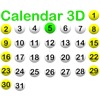
Calendar 3D
by Aleksandr Varaksa
v1.3
·
Updated 4 months ago
·
0 Bytes
·
Released Feb 2017
Key Features
🤖
AI Powered
📅
Calendar
✅
Task Management
💻
Code Editor
🖥️
Terminal / CLI
🗜️
Archive / Compress
About Calendar 3D
* Calendar 3D - event calendar (todo list).
* You see elapsed/remaining time from/to event.
* Each event can be periodic.
* Keeps history of all events.
* You can add a note and colored ball/flower to each event.
* Two kinds of the calendar - the week begins from Sunday / Monday (selector S/M).
* All your data is saved in simple text file - therefore you can securely store it in any place.
* Choose a calendar day of the month, add an event by clicking (+).
* Select event starting time by dragging arrows on the clock.
* Choose this events ball/flower color using slider.
* Add a note.
* Select duration by dragging sliders.
* Choose [Period] tab and select time between repeats of this event.
* Select how many repeats you want via dropdown.
* All data is saved automatically.
* You can remove any event by selecting it in the table and clicking (-).
* Under the clock you see:
* |> elapsed time from event.
* >| remaining time to event.